A few months ago, a podcast introduced me to the idea of an “AI Chief of Staff.” An agent that reads your email and calendar, drafts responses, and decides what you should be working on right now. I was immediately excited! I didn’t even mind that it was built using Claude Code; I’m no stranger to the command line interface, so my hesitation was never about the technical side.
The real challenge was that even if I sat down to build something like that, there’s no way I would be able to deploy it at work. Because I work in higher education, with some of the most sensitive data the college possesses, there is no way I would ever be able to get permission to install an agentic AI tool on my work computer, or convince my IT department to let me connect an AI tool to my email and calendar. I could picture exactly how my productivity would improve: the competing priorities, personnel issues, concurrent projects, endless meetings, all of it surfaced and managed. But if I couldn’t deploy it at work, there was no point in investing the time.
Then I got an interesting idea, inspired by one of Hilary Gridley’s Substack articles. Even though I couldn’t install an AI application on my work computer, I could still build a rough concept of an AI task management and assistant app that leverages AI. I scoped out what the project would look like. I started with a Claude Project featuring a robust set of instructions and some markdown files. Each week, I would start by entering key tasks and deadlines, and each day I would start with the day’s constraints (any meetings, plus my energy and focus). Claude would analyze my tasks and projects against my instructions to help me identify areas to delegate work to my staff and surface which tasks were best suited for the time, focus, and energy I reported each day. As new things popped up, either via email or following meetings, I would open the chat to tell Claude about them and it would update its memory.
I used my DIY Claude “app” for a few weeks before I started to want something a little more formal and tangible to work with. Claude’s memory wasn’t perfect and I wanted a real task dashboard to keep my tasks listed and tagged with metadata to help inform task prioritization. I had a valuable concept that could be more helpful if I put some more effort into building it out.
After workshopping some ideas with Claude based on my current use and the limitations of my workplace environment, I landed on building an HTML task dashboard with a JSON back end to store my detailed tasks and their metadata.
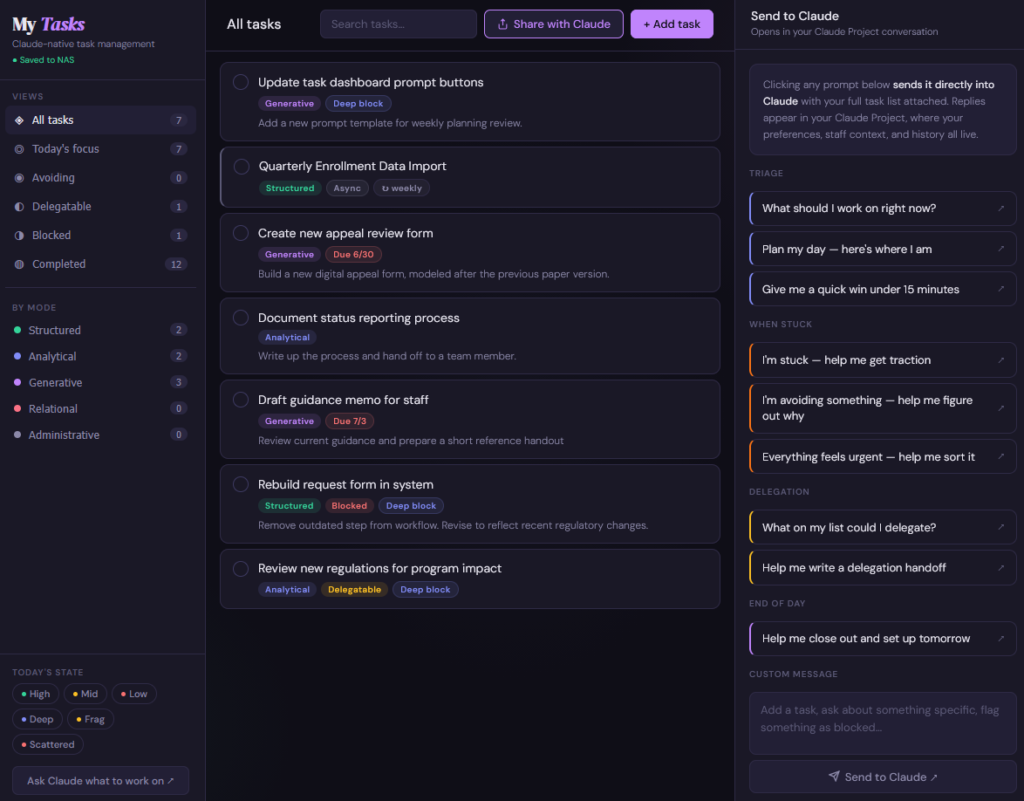
Because I still wanted an AI-powered task management app, I designed the task app with various prompt buttons that would call the Claude API and pass in information from my task app. Prompts like, “I’m feeling stuck. Help me get started on this project by breaking it down into more manageable steps.” or “Everything feels urgent. Help me sort through tasks to prioritize them.” However, I soon became slightly concerned about burning through API tokens, so I adapted the dashboard interface so the prompt buttons copy the prompt and task information to the clipboard so I could paste it into my Claude chat account.
This turned out to matter for a reason I hadn’t expected. Telling Claude that I was going to do something created a kind of accountability that just typing a task into a list never did. Not because Claude was checking up on me, but because saying it out loud, even to an AI, made it real in a way a checkbox didn’t. Everyone has different productivity strategies, and I discovered that having an accountability partner (even an AI) helps nudge me from staring at my task list to actually getting things done. I’ve been using the new dashboard for two months and I’ve felt considerably more productive, which is especially noteworthy coming out of one of the busiest times of the year.
The most exciting part of this project isn’t just that I was able to vibe-code a task management app with AI. It’s that I took an ambitious idea, acknowledged that it would never fit within the constraints of my work context, and modified it just enough to work within those constraints and still be a useful tool. By starting with a rough proof of concept and building it out once I knew the concept was sticking, I refined the scope of the project into what would work for me, my work style, and my environmental constraints. Plus, I learned some valuable vibe-coding skills that I can keep building on in the future. I didn’t end up with the AI chief of staff I first imagined. I ended up with something more useful: proof that the right scope for an AI tool isn’t the most ambitious one. It’s the one that survives contact with the environment you actually work in.